
Swipe through the powerful capabilities that make CrystalDiskInfo the industry standard.
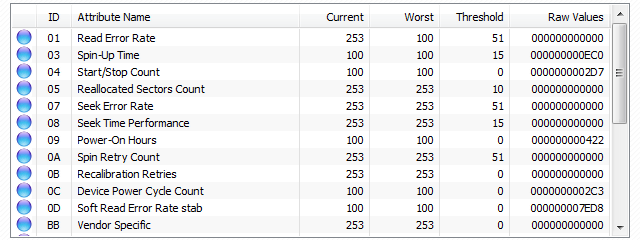
Access detailed raw and normalized values for all self-monitoring attributes to assess drive integrity instantly.
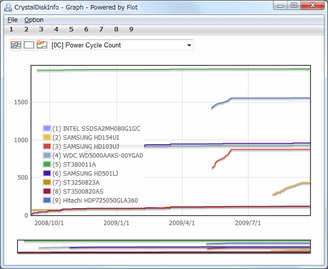
Track historical trends for critical health attributes like temperature or reallocated sectors over time.
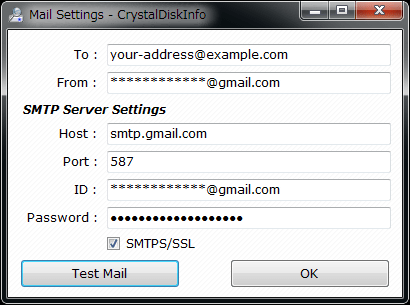
Configure automatic email alerts to be notified instantly if drive health status changes or temperature limits are exceeded.
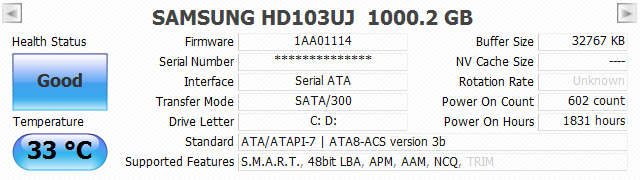
Get an immediate overview of essential details like firmware version, serial number, interface speed, and transfer mode.
Saved my data more times than I can count. The early warning system is flawless. A must-have utility.
SysAdmin
Essential diagnostic tool for any PC build. Clean, fast, and accurate. I install it on every machine.
Tech Enthusiast
Using it for 10 years. With the new dark theme and glass UI, it looks as modern as it performs.
Software Dev

Industry standard storage benchmarking tool. Measure Read/Write performance with precision.
Download Benchmark
Comprehensive system benchmarking suite. Test CPU, RAM, Graphics, and Drives with a nostalgic touch.
Download Benchmark
Latest Stable Version
Registry entry created when "Startup" feature is enabled.
Windows Registry Editor Version 5.00

[HKEY_CURRENT_USER\Software\Microsoft\Windows\CurrentVersion\Run]
"CrystalDiskInfo"="\"C:\\Program Files\\CrystalDiskInfo\\DiskInfo.exe\" /Startup"Supported arguments for automation and batch processing.
DiskInfo.exe /Copy      ; Output "Edit > Copy" result to DiskInfo.txt
DiskInfo.exe /CopyExit  ; Output result and auto exit
DiskInfo.exe /Exit      ; Auto exit after updating S.M.A.R.T. info